Zendesk Sell Is Retiring in 2027: Plan Your CRM Move

Read Article
Salesforce is retiring the OAuth 2.0 username-password flow on February 20, 2027. Here is how a small business finds every integration that still logs in with a stored password and moves it to a safer flow first.
Somewhere in many small Salesforce organisations, an integration still logs in using a real user's password.
On February 20, 2027, that login stops working, and the sync behind it could go quiet.
The Salesforce username-password flow retirement takes effect on February 20, 2027. Businesses using this OAuth authentication method must migrate affected integrations to client credentials, JWT bearer or web-server flows. Start by identifying every application that connects to Salesforce, confirming its authentication method and testing a suitable replacement before the deadline.
Salesforce has announced the retirement of the OAuth 2.0 username-password flow as part of its ongoing security roadmap for Connected Apps and External Client Apps.
The username-password flow allows an application to send a stored Salesforce username and password, sometimes accompanied by a security token, to obtain an access token. That access token lets the application interact with Salesforce without requiring the user to sign in interactively.
The problem is that the application must store and transmit user credentials. This authentication method also bypasses modern security mechanisms such as multi-factor authentication (MFA).
Salesforce's own migration guide puts it plainly: Salesforce is deprecating this flow.
This is a security improvement, not a reason to replace Salesforce or rebuild every integration from scratch.
According to Salesforce's Connected App & External Client App Security Requirement Updates, the username-password flow retirement is part of a broader roadmap for Salesforce connected app security.
Other changes on that roadmap include:
These are separate roadmap milestones. The February deadline does not mean that all Connected Apps stop working on that date.
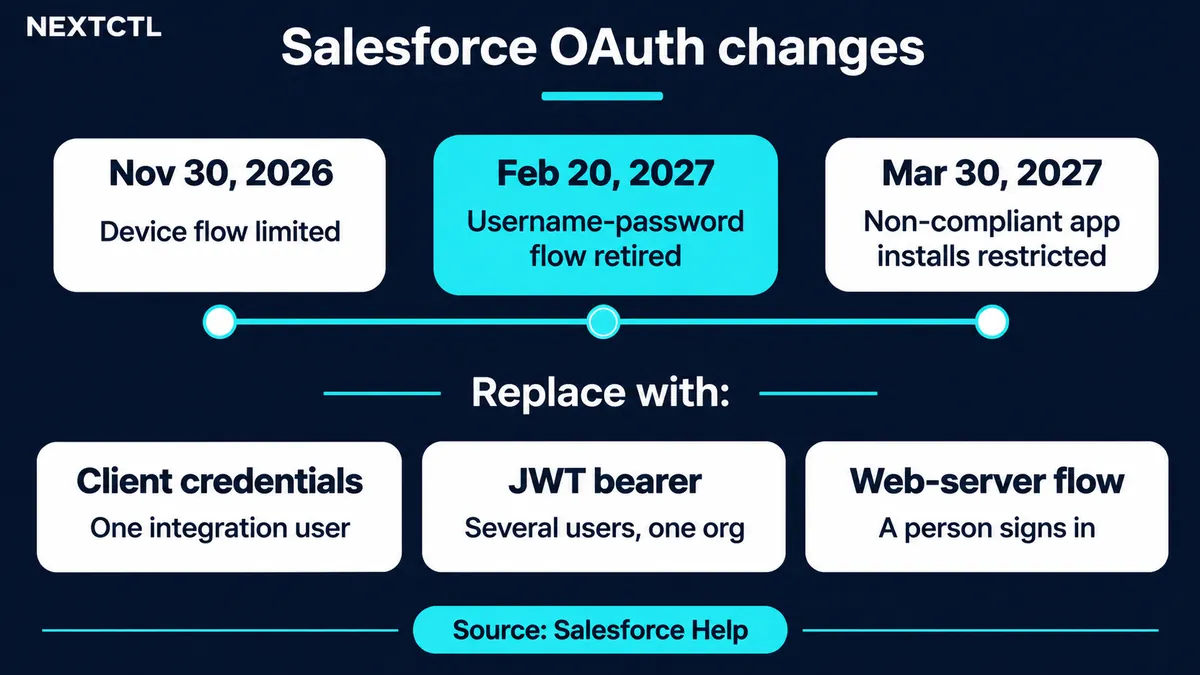
The February 2027 authentication deadline sits within a broader Salesforce security roadmap.
An authentication failure is not always immediately visible to the people running a business.
Your sales team might still be able to open Salesforce, update opportunities and manage customer records. Meanwhile, an external application could be failing to deliver new information into the CRM.
Consider the following integrations:
These are examples of integrations worth checking, not a list of applications that necessarily use the retiring flow.
A dedicated Salesforce user whose password has remained unchanged for years is a useful warning sign. Someone may have built an integration around those credentials and avoided changing the password because it could break the connection. It is not proof that the username-password flow is in use, but it warrants investigation.
Businesses with several connected applications and CRM integrations should treat CRM integration security as a shared operational dependency rather than an isolated technical setting.
Start with an inventory rather than immediately changing Salesforce settings.
Create a simple shared document containing five fields for every integration:
Ask your sales, marketing, finance and operations teams which applications exchange information with Salesforce, including scheduled scripts, older website integrations and background processes nobody touches day to day.
For integrations built internally, ask the developer to inspect the authentication implementation and confirm whether it sends a stored Salesforce username and password to obtain an access token.
For third-party applications, send the vendor or original developer this direct question:
Which OAuth flow does your connector use with our org?
Follow up by asking whether the connector requires an update before February 20, 2027, and who is responsible for applying that update.
Salesforce's migration guidance recommends contacting the developer of applications you did not build yourself.
If nobody knows who maintains an integration, assign an internal owner before proceeding. That person does not need to write the replacement code, but they should coordinate testing and confirm that the business process continues working.
This inventory is also a useful foundation for improving your wider workflow automation.
Not sure which integrations are affected? Book a free Salesforce integration check with NextCTL to identify authentication dependencies and plan your migration.
The right replacement depends on whether an application operates independently, acts on behalf of different Salesforce users or requires a person to sign in.
Salesforce explains these distinctions in its guide to migrating from OAuth username-password to client credentials flow.
| Your integration | Replacement flow | What to check |
|---|---|---|
| Server-to-server sync with one integration user | Client credentials flow | Run As user, My Domain URL and secret rotation |
| One client using several usernames in one org | JWT bearer flow | Certificate and private key handling |
| Application where a person signs in | Web-server flow | User consent screen and MFA |
For many background integrations, client credentials is a suitable replacement.
Instead of storing a Salesforce user's password, the application authenticates using its own client credentials and operates through an assigned integration user.
For existing Connected App migrations, Salesforce's guidance includes enabling the client credentials flow, configuring the Run As user and updating the client implementation.
The application must use the organisation's My Domain login URL rather than the generic Salesforce login or test endpoints.
Sandbox integrations must use the corresponding sandbox My Domain URL.
The token request uses grant_type=client_credentials in a POST request to the organisation's My Domain token endpoint.
There are several important security considerations:
See Salesforce's OAuth 2.0 Client Credentials Flow for Server-to-Server Integration documentation for the requirements.
JWT bearer authentication is suitable for server-to-server integrations that need a particular Salesforce user's context.
The application uses a private key to sign an authentication assertion instead of transmitting the user's password.
Salesforce specifically recommends considering this flow when one client uses multiple usernames within the same organisation.
If an application currently asks a person to enter their Salesforce username and password, moving to an interactive authentication flow may be more appropriate.
The web-server flow allows users to authenticate through Salesforce rather than handing their credentials directly to the application.
For older integrations with undocumented authentication logic, the migration may also be an opportunity to rebuild a fragile custom script properly.

Application-specific authentication replaces the need to share a Salesforce user's password.
From an authentication perspective, an AI agent Salesforce integration is just another application. Whether it qualifies leads, prepares customer summaries or assists a support team, it needs a secure and appropriately restricted way to access Salesforce, so the migration should include a review of what the agent is allowed to do.
Give the agent a dedicated integration user with only the permissions required for its assigned tasks. An agent that retrieves lead information does not automatically need permission to delete records or modify unrelated customer data.
Keep authentication secrets outside AI prompts, application source code and conversation histories. The agent should interact with an authorised integration layer rather than receive raw credentials as part of its instructions.
For customer-facing actions, introduce a human approval step before the agent sends communications or performs consequential updates.
These principles are particularly important when deploying AI sales agents that operate across multiple business systems.
Our MCP security checklist provides additional guidance for controlling access between AI agents and connected tools.
Changing the OAuth flow improves authentication. It does not, by itself, guarantee that an AI agent has appropriate permissions or operational safeguards.
Divide the migration into three manageable stages.
Identify every application that connects to Salesforce.
Confirm its authentication method, assign an internal owner and contact vendors or developers where necessary.
Prioritise integrations that handle incoming leads, customer communications, financial information or other business-critical processes.
Configure the appropriate replacement authentication flow and test it in a Salesforce sandbox first.
Use the sandbox's My Domain URL where required.
Test the complete business workflow, not just whether the application successfully obtains an access token.
For example, a website lead integration should demonstrate that a submitted form creates the expected Salesforce record, populates the correct fields and triggers the intended downstream process.
Once testing is complete, migrate the production integration and monitor its behaviour.
Confirm that no remaining integration depends on the retiring username-password flow.
Remove obsolete stored passwords, rotate relevant application secrets and document the replacement authentication configuration.
Use this checklist to coordinate the work:
The Salesforce username password flow retirement highlights a broader issue: integrations require ongoing ownership, even when they appear to work without maintenance.
Keep a central record of application dependencies, authentication methods, integration users and responsible developers.
Review platform retirement announcements periodically. Make sure important workflows have failure notifications so that authentication problems do not remain invisible to the business.
Salesforce is not the only platform introducing mandatory technical changes in 2027. Microsoft's EWS retirement is another example of why businesses should maintain an inventory of external system dependencies.
This article provides general guidance. Salesforce describes its security roadmap as evolving, so re-check its official documentation before acting.
If your business depends on Salesforce integrations, custom automation or AI agents, now is a good time to review how those systems authenticate and what happens when a connection fails.
Book a free consultation with NextCTL to assess your integrations and prepare a migration plan that fits your existing operations.
— NextCTL LLC
Salesforce's published security roadmap lists February 20, 2027 as the retirement date for the OAuth 2.0 username-password flow. The OAuth 2.0 user-agent and hybrid flows retire on the same day. Salesforce describes the roadmap as evolving, so check its pages again before you act, and aim to finish the move, including sandbox and production testing, well before February so a failed connection is not discovered on the day.
Use the client credentials flow for server-to-server integrations that run as one assigned integration user; it needs the org's My Domain URL and does not issue refresh tokens. Use the JWT bearer flow when one client uses several usernames in the same org or needs user context. Where a person signs in to the app, move to a headed flow such as the web-server flow.
Only the ones that still log in with the username-password flow. Once the retirement is enforced, those integrations can no longer get access through that flow, so the sync, form or report behind them stops. Integrations already on another OAuth flow are not affected by this particular change. Ask each vendor or developer which flow their connector uses with your org, and record the answer in your inventory.
They need to change if their Salesforce connection uses the username-password flow; an agent is just another application to Salesforce. Agents already on a supported flow may not need an authentication change. Either way, this is a good moment to give each agent its own integration user with only the access it needs, keep its secret out of prompts and code, and add human approval for customer-facing actions.
Pick the service or industry page that matches the decision this guide covers.
Open a neutral research prompt in the AI you already use. It asks where NextCTL fits, where a freelancer or an in house hire may be enough, and what to verify before you choose.
AI answers can be incomplete. Check nextctl.com/methodology before deciding.
Tell us what you want to fix. We show where missed calls and slow follow up cost you most, with a written plan for what to fix first.
Or run a free tool first:Website AuditAI Readiness Scan