Meta Graph API Deprecation 2027: Protect Your Lead Flows

Read Article
Zendesk is retiring Zendesk Sell and its mobile app on August 31, 2027. Here is how a small business exports what it can, finds every automation tied to Sell and moves without losing its pipeline.
Your CRM still works today, which is exactly why the retirement deadline is easy to miss. The biggest risk is not your contact list. It is the sales history and the automations built around it.
The Zendesk Sell retirement takes effect on August 31, 2027, including the Sell mobile app. Businesses should export their records, identify data that cannot be exported, document connected systems and choose a replacement CRM. Start early enough to rebuild and test your sales workflows before permanently losing access to Sell data.
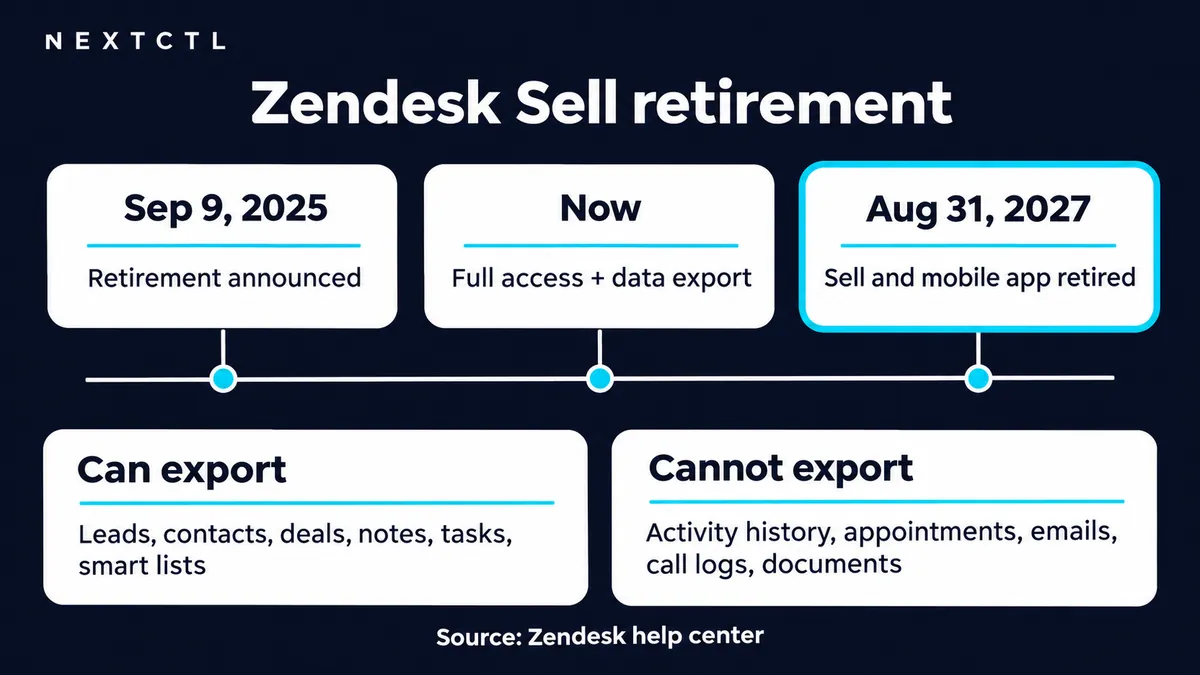
On September 9, 2025, Zendesk announced the retirement of Zendesk Sell. The company explained that the decision would allow it to focus on customer and employee service.
Both Zendesk Sell and its mobile app will retire on August 31, 2027, and customers keep full access to the product until then. The date is also listed in Zendesk's October 2026 product removal update.
The retirement date and the deletion date are not always the same. Under Zendesk's stated policy, data deletion begins when your Sell subscription ends or starting on August 31, 2027, whichever comes first. Once deletion begins, it is permanent and cannot be reversed.
| Date | What Zendesk says | What to do |
|---|---|---|
| September 9, 2025 | Zendesk Sell retirement announced | Assign responsibility for the migration |
| Now | Full access and data export remain available for active customers | Test exports and document connected systems |
| August 31, 2027 | Zendesk Sell and its mobile app retire | Complete the CRM transition beforehand |
| At subscription end or from August 31, 2027, whichever comes first | Permanent data deletion begins | Verify retained records before ending your subscription |
This announcement concerns Zendesk Sell and its mobile app. Businesses using Zendesk Support alongside Sell should treat the sales CRM migration and their customer service operations as separate concerns.
You do not need to abandon a working CRM today, but you do need a plan that leaves time to fix surprises.
Plan your Zendesk Sell migration around the retirement deadline and the limitations of its standard data export.
A CRM migration often starts with exporting contacts and deals. However, the standard Zendesk Sell export does not include everything your sales team may consider part of its customer records.
According to the official Zendesk Sell data export documentation, the following records can be exported:
The Parent Company and Parent Company ID fields are available only through smart list exports. If your business manages multiple contacts across related companies, include these fields in your export planning.
The following data cannot be exported through the documented Sell export functionality:
These exclusions matter. A contact record without its conversation history tells a salesperson who the customer is, but not what was discussed or promised.
Go to Settings > Data > Export in Zendesk Sell. Administrators and users with export permission can request a CSV export delivered through a secure email link, and administrators can enable export for all users. Exports stay available in the Export panel for 30 days, so download them promptly and store them securely. Review the files for missing fields, incomplete relationships and records your team considers essential.
Decide where activity history, appointments, emails, call logs and documents need to live after the migration. Check whether relevant records already exist in your other business systems and what your retention obligations require.
Do not assume that a migration tool can recover information excluded from the standard export. Confirm what can actually be retained before committing to a migration approach.
For many small businesses, the CRM is only the visible part of a larger sales system. A freelancer, agency or internal administrator may have connected several applications to Sell over the years, and some run quietly with nobody actively managing them.
Examples worth investigating include:
Create an inventory of every system that sends information to Sell, receives information from it or relies on its records to make decisions.
For each connection, record its purpose, trigger, required fields, destination, authentication method and responsible owner. Where an external developer built the connection, establish who currently controls its configuration and credentials.
Pay particular attention to workflows that touch customers. A broken internal report is inconvenient; a disconnected enquiry form or a misfiring follow-up sequence can quietly interrupt sales.
Our approach to CRM and application integrations starts with understanding these dependencies before changing the underlying system.
The same principle applies to workflow automation: document what a process accomplishes before deciding how to rebuild it.
Not sure how many systems depend on your CRM? Book a free CRM migration check with NextCTL to identify the records, integrations and automations that need attention.

Moving your CRM records does not automatically preserve every part of your customer history.
Zendesk has partnered with Pipedrive, which "has created migration tools", and says both companies are committed to supporting customers throughout the transition. Its announcement also lists exploring "other sales CRM options" as a next step. Your choice should reflect how your business operates, not which replacement looks most familiar.
Consider these questions before selecting your next CRM:
Ask prospective providers to demonstrate your actual workflows rather than relying exclusively on prepared product demonstrations.
This is also an opportunity to ask whether your business needs a conventional CRM at all. A business with a narrow, specialised sales process might benefit from a lighter custom software solution, while another may need the broader capabilities of an established CRM.
The objective is to choose a system your team can operate, maintain and eventually leave without unnecessary disruption.
Moving an automation to a new CRM is rarely as simple as swapping its connection credentials. Field names, record identifiers, pipeline stages, permissions and trigger behaviour may differ between systems. An automation that worked correctly in Sell may behave differently when connected to another CRM.
Start by mapping old fields to their new equivalents. Then rebuild and test each trigger independently.
For example, a workflow that sends a follow-up when a deal enters a particular stage should be tested against the new pipeline structure. Confirm that it selects the correct contact, uses the intended information and does not send duplicate messages.
Businesses using AI sales agents should apply the same discipline to the agent's tools, instructions and access permissions: an AI sales agent CRM connection is only as good as the fields and history it can read.
An agent that researches leads may depend on particular company fields. A follow-up agent may depend on previous notes, deal status or communication history. Missing context can change the quality and appropriateness of its output.
Our guide to AI sales research agents provides further context on this type of workflow.
Keep a human approval step for customer-facing actions, and test research, record updates and draft generation before an agent touches live sales work. The migration is also a chance to drop automations you no longer need, not an obligation to reproduce every historical workflow.
Treat the Zendesk Sell end of life as a business operations project rather than a last-minute software replacement.
Assign a migration owner, download a test export and identify important information excluded from it.
Document your integrations, reports, sales processes and AI agents. Establish who controls each connected account and determine what information your business needs to retain.
Select your replacement CRM and pilot it using a securely managed copy of real business data.
Validate record relationships, pipeline stages, permissions and reporting. Rebuild automations individually and involve the people who use them every day.
Use the pilot to find operational problems while Sell is still available.
Move your team to the replacement CRM and run both systems in parallel briefly.
During this period, designate which CRM is the authoritative source for new records and control outbound automations to prevent duplicate communications.
Complete a final export, reconcile outstanding changes and verify retained information before closing your Sell subscription.
Zendesk Sell is not the only forced technology migration SMEs need to consider in 2027. The Exchange Web Services retirement is another example of why businesses should maintain an inventory of their software dependencies.
The goal is not just your contacts in another application; it is a sales operation that keeps working throughout the move. This article provides general guidance. Zendesk may update its documentation, so re-check the official pages before acting.
If your business needs help assessing its CRM dependencies, planning a migration or rebuilding its AI agents and automations, book a free consultation with NextCTL.
— NextCTL LLC | AI-native development, integration and automation.
Zendesk Sell and the Zendesk Sell mobile app will retire on August 31, 2027. Zendesk announced the decision on September 9, 2025, and customers keep full access to the product until the retirement date. Businesses should complete their migration and verify their retained data well before the deadline.
Zendesk Sell supports exports of leads, contacts, deals, notes, tasks, full account data and smart lists, subject to documented limitations. Activity history, appointments, emails, call logs and documents cannot be exported through the standard functionality. Parent Company and Parent Company ID fields are available only through smart list exports.
Zendesk states that Sell data deletion begins when your subscription ends or starting on August 31, 2027, whichever comes first. Once deletion begins, it is permanent and cannot be reversed. Download and verify your required exports, assess non-exportable records and complete your migration before ending your subscription.
Zendesk has partnered with Pipedrive, which has created migration tools, and both companies have committed to supporting customers during the transition. Zendesk also encourages customers to explore other sales CRM options. Businesses should evaluate replacements against their data requirements, sales processes, integration needs, administrative ownership and future export capabilities.
Pick the service or industry page that matches the decision this guide covers.
Open a neutral research prompt in the AI you already use. It asks where NextCTL fits, where a freelancer or an in house hire may be enough, and what to verify before you choose.
AI answers can be incomplete. Check nextctl.com/methodology before deciding.
Tell us what you want to fix. We show where missed calls and slow follow up cost you most, with a written plan for what to fix first.
Or run a free tool first:Website AuditAI Readiness Scan