Zendesk Sell Is Retiring in 2027: Plan Your CRM Move

Read Article
Meta is removing Graph API v21.0 on January 21, 2027 and v22.0 on May 20, 2027. Here is how a small business finds the automations that call them and upgrades without losing leads.
Your Facebook lead form may keep working after its API version is removed. That is precisely the problem: Meta quietly moves old API calls to a newer version, meaning your integration's behaviour can change without an obvious error.
The Meta Graph API deprecation schedule for 2027 removes v21.0 on January 21 and v22.0 on May 20. Small businesses should identify which API versions their lead capture, publishing, messaging and reporting integrations use, migrate to a current version, and verify that their complete workflows still operate as expected.
On November 4, 2026, Meta announced Graph API v27.0 alongside the upcoming removal of two older Graph API versions.
These deadlines matter to any business with custom integrations connecting Facebook or Instagram to its CRM, internal systems, marketing workflows or AI agents. You do not need to understand every API request, but you do need to know whether you depend on a version that is about to retire.
Here are the relevant dates from Meta's Graph API version schedule and its November 2026 release announcement.
| Date | What Meta says | What to do |
|---|---|---|
| November 4, 2026 | Graph API v27.0 released; six legacy request features closed to new apps | Review existing integrations and legacy dependencies |
| January 21, 2027 | Graph API v21.0 removed | Complete migration and testing before this date |
| May 20, 2027 | Graph API v22.0 removed | Plan for the Graph API v22 deprecation and upgrade remaining v22.0 integrations |
| October 8, 2027 | Graph API v23.0 expires | Avoid treating v23.0 as a long-term migration target |
Graph API v27.0 is the latest version at the time of writing.
Moving an integration from v21.0 to v23.0 might address the immediate deadline, but it only buys a few additional months. Version selection should consider compatibility and the remaining support period.
Also note that the Marketing API has its own separate version schedule. If your reporting or advertising automation uses both APIs, your developer should review them independently.
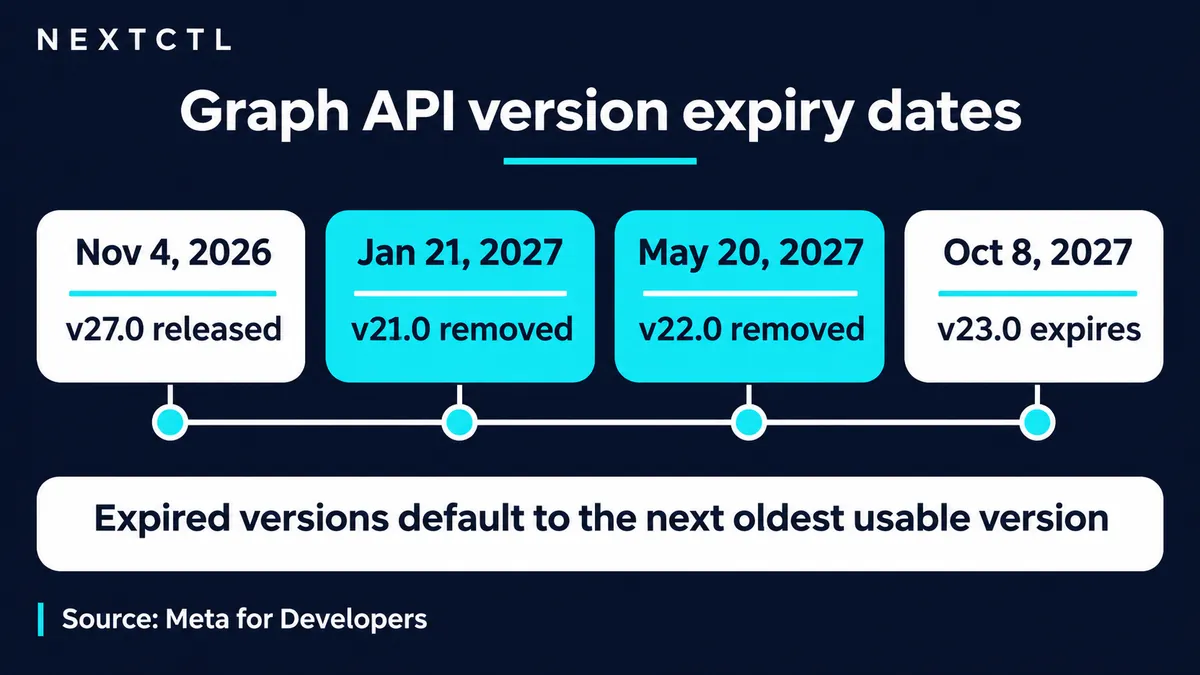
Meta's Graph API retirement schedule gives businesses clear deadlines for reviewing and upgrading their integrations.
Think of the Graph API as the agreed way your business software talks to Meta's platforms. Each version defines what your integration can request and how it receives the results.
According to Meta's Graph API versioning guide, each version is guaranteed to operate for at least two years.
Once a version expires, Meta says that calls to it are "defaulted to the next oldest, usable version".
Requests that do not explicitly specify a version use the version configured in the app dashboard under Settings > Advanced. Meta recommends specifying the version in API calls.
Meta also advises developers to assume that an end-of-life software development kit, or SDK, is no longer functional.
For a business owner, the important distinction is between an integration that stops working and one that continues working differently.
An obvious failure might trigger an alert. A less obvious change could leave your workflow running while some information is missing, a report behaves differently or a downstream automation receives unexpected data.
Automatic version migration is useful, but it is not a substitute for testing your business workflows.
Many SMEs commission an integration, confirm it works and leave it running without regular maintenance. The original developer may have moved on, and your marketing team may not know which Meta app powers the automation.
Common areas worth reviewing include:
The risk is not limited to the connection with Meta. It extends to everything that depends on that connection.
For example, a Facebook lead submission might trigger a CRM record, assign a salesperson and initiate a follow-up message. If the original data transfer changes, the downstream workflow may not behave as intended.
This matters particularly when your missed-call text-back and lead follow-up workflows depend on receiving enquiry information promptly.
Reviewing your business integrations as connected workflows, rather than isolated applications, makes it easier to identify these dependencies.
Not sure which Meta API version your business uses? Book a free Meta integration check with NextCTL to identify the connections that need attention before the upcoming deadlines.
Start with the person or agency that built your integration and ask them to identify the Meta apps, API versions and SDK versions involved. "It still works" is not enough; you need to know what it depends on.
Next, locate your Meta app dashboard. Confirm who owns the app, who has administrative access and which API version is configured under Settings > Advanced.
Remember that the dashboard setting alone does not establish which version every request uses. Your integration may explicitly request a different version.
Ask your developer to search the source code and automation settings for the literal string graph.facebook.com/v. This can help locate requests with explicitly specified API versions.
SDK-based integrations may require a separate review of their configuration and dependencies.
Create a simple inventory recording each Meta app, its business purpose, its API version, associated access tokens, connected systems and responsible owner.
Record token ownership and storage locations securely rather than copying token values into a shared document.
If nobody can confidently explain how an important integration works, treat that as a maintenance issue in its own right.
Businesses using custom AI agents can incorporate these reviews into their managed AI services arrangements rather than relying on occasional emergency fixes.
The November 2026 announcement also introduced changes that may affect older integrations independently of the 2027 version deadlines.
From November 4, 2026, new apps cannot use six legacy request features:
Existing apps cannot introduce new uses of these features, and remaining uses are scheduled for deprecation in v28.0.
Meta also announced that the Page metric total_video_consumption_rate stopped returning data across all API versions in early November 2026.
If an older reporting dashboard relies on that metric, changing its API version alone will not restore the data.
The announcement additionally identifies Facebook Platform SDK v21.0 and v22.0 for deprecation in January and May 2027, respectively.
Ask your developer to review these dependencies alongside the Graph API version upgrade.
A planned API migration keeps essential business workflows operating while outdated connections are replaced.
A safe migration starts with defining success in business terms. For lead capture, that means more than a successful response from Meta: the enquiry has to reach the right person with the information needed to follow up.
Establish a baseline. Document how your current integration behaves. Capture representative CRM records, reporting outputs, notifications and chatbot conversations before making changes.
Move to a current version. Ask your developer to review the relevant changes and migrate requests to a current Graph API version. Update outdated SDK dependencies where necessary.
Test the complete lead journey. Submit a test lead and confirm that the expected contact information arrives in your CRM, the correct salesperson is assigned and the intended follow-up workflow runs.
Compare reporting outputs. Use equivalent reporting periods and settings to identify unexpected differences between the old and updated integration. Investigate missing metrics rather than automatically interpreting them as zero.
Review messaging and AI behaviour. If you use custom AI chatbot development for Messenger or Instagram, check message reception, replies, conversation routing and human handover.
Keep a human review process in place for important AI-generated replies during the transition.
Incoming messages and comments should also be treated as untrusted input. An API upgrade is a useful opportunity to review protections against prompt injection in AI agents, particularly when an agent can access customer records or trigger external actions.
Finally, monitor the updated workflows after deployment. A successful test is important, but ongoing visibility helps your team identify unexpected behaviour during normal business operations.
You do not need to rebuild every Meta integration at once. Prioritise the workflows that are most important to customer enquiries, sales and daily operations.
November and December 2026: Inventory your integrations, establish ownership and identify dependencies on older versions. Review the legacy request features and affected reporting metric.
Before January 21, 2027: Complete migration and end-to-end testing for integrations using Graph API v21.0.
Before May 20, 2027: Complete the same process for integrations using Graph API v22.0.
Before October 8, 2027: Address any remaining dependencies on Graph API v23.0.
Ongoing: Put a recurring API version and integration health review on your calendar.
For businesses that also want the content planning and publishing side handled, our social media marketing services can complement the technical maintenance of connected workflows.
Meta's versioning is a normal part of a platform that keeps evolving; the goal is to be ready for each change, not to avoid it.
This article provides general guidance; Meta updates its documentation frequently, so re-check the linked official pages before implementing your migration.
If your business depends on Facebook leads, automated messaging or custom Meta integrations, request a free consultation to review your dependencies and prepare a practical migration plan.
— NextCTL LLC | AI-native development, integration and automation.
Meta is removing Graph API v22.0 on May 20, 2027. Businesses using this version should complete their migration and workflow testing before that date. Moving to v23.0 offers limited additional time because that version expires on October 8, 2027. Review compatibility with a current version instead of planning repeated short-term upgrades.
Meta automatically defaults requests targeting an expired version to the next oldest usable version. This means an integration may continue operating rather than immediately returning an error. However, differences between versions can affect the information returned or the behaviour of connected workflows. Businesses should explicitly migrate and test their integrations rather than relying on automatic version changes.
Check the version setting in your Meta app dashboard under Settings > Advanced. Then ask your developer to inspect API requests, SDK dependencies and automation configurations for explicitly specified versions. The dashboard setting does not necessarily represent every request your integration makes. Record the findings alongside the app's owner and business purpose.
Not necessarily. The removal of a Graph API version does not automatically mean your Facebook lead ads integration will stop working. Its behaviour depends on how it was built and which API features it uses. Submit a test lead after upgrading and verify that the CRM record, contact information, notifications and follow-up actions all work as expected.
Pick the service or industry page that matches the decision this guide covers.
Open a neutral research prompt in the AI you already use. It asks where NextCTL fits, where a freelancer or an in house hire may be enough, and what to verify before you choose.
AI answers can be incomplete. Check nextctl.com/methodology before deciding.
Tell us what you want to fix. We show where missed calls and slow follow up cost you most, with a written plan for what to fix first.
Or run a free tool first:Website AuditAI Readiness Scan