
Blog
RAG for Business: Build a RAG Chatbot That Answers From Your Documents
What a RAG chatbot is, how to build one for your business, use cases by industry, RAG vs fine-tuning, and what makes answers accurate and secure.
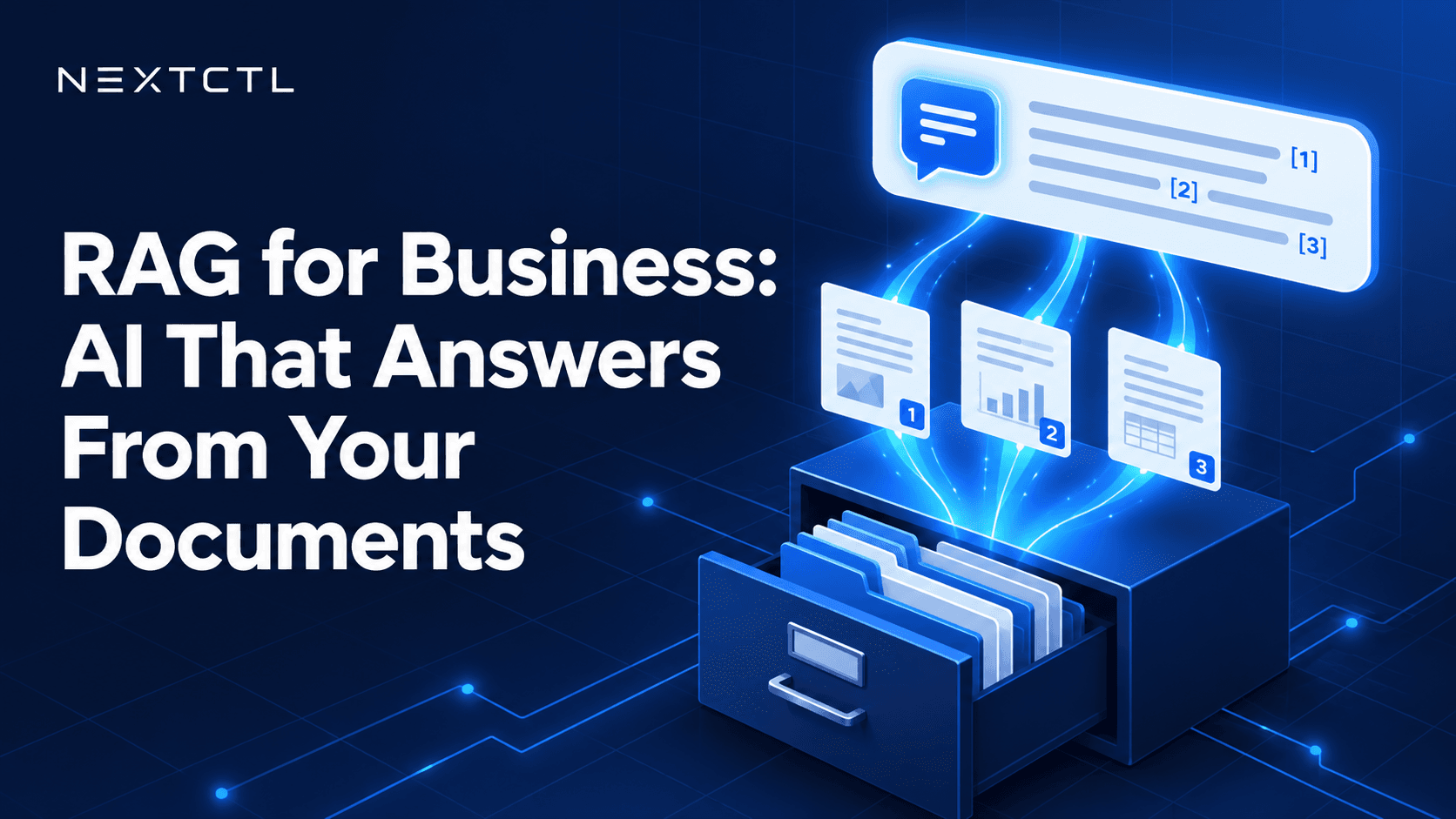
RAG (retrieval-augmented generation) is a way to make an AI model answer from your own documents. When someone asks a question, the system first searches your approved content, then gives the most relevant passages to the language model, which writes an answer and cites its sources. You update documents, not the model.
Ask a general AI assistant about your refund policy, your pricing for a commercial job or the steps in your onboarding checklist, and it will either guess or tell you it does not know. It has never seen your documents. A RAG chatbot fixes this. It finds the right passages in your own files and answers from them, with sources you can check.
This guide explains RAG for business owners, not engineers: what a RAG chatbot is, how it works, where it pays off, how it compares with fine-tuning, how to build one and how to know it is accurate.
What is a RAG chatbot?
A RAG chatbot is a chat assistant built on retrieval-augmented generation. The system first retrieves relevant information from your own content, then uses a language model to generate an answer based on that information. Instead of relying on what the model learned during training, it works from your current documents.
The technique was introduced in a 2020 research paper by Lewis et al., which combined a language model with a searchable index of documents so answers could draw on knowledge outside the model. McKinsey’s RAG explainer describes the business benefit in similar terms: specific, cited outputs without extensive fine-tuning.
A simple way to picture it: a capable new employee who has not memorised your handbook, but who looks up the right page every time before answering, and tells you which page they used.
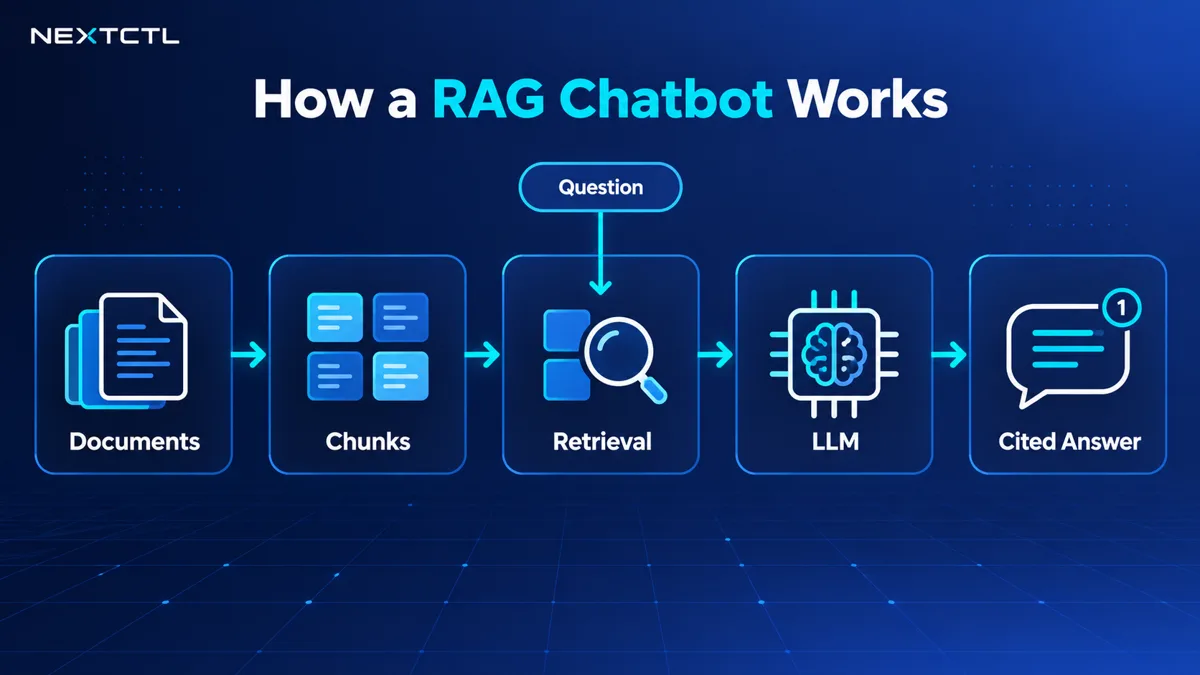
How a RAG chatbot works, step by step (RAG architecture)
- Ingest. Your sources are gathered: policies, manuals, contracts, help articles, product sheets, past tickets, wiki pages.
- Chunk. Documents are cleaned and split into passages, each tagged with where it came from, its date and who is allowed to see it.
- Embed and index. Passages are converted into numerical “embeddings” and stored in a vector database that matches by meaning, often combined with keyword search.
- Retrieve. When someone asks a question, the system finds the most relevant passages.
- Generate. The language model writes an answer using only those passages.
- Cite, or refuse when unsure. The answer links to its sources. If nothing relevant is found, a well-built system says so instead of inventing an answer.
Why use RAG instead of ChatGPT on its own?
General AI tools are useful for drafting and brainstorming. For questions about your own business, a chatbot with RAG has clear advantages:
- Answers reflect your current content. Update the document and the answer changes, with no model retraining.
- Sources are visible. Staff and customers can click through to check the original.
- Access can be controlled. A sales rep should not see HR files; a customer should not see internal pricing notes. Permissions can be applied at retrieval time.
- Fewer made-up answers. Grounding the model in retrieved text and requiring citations reduces, though does not eliminate, the risk of hallucination.
RAG vs fine-tuning: which do you need?
| Plain chatbot (general model) | RAG chatbot | Fine-tuned model | |
|---|---|---|---|
| Knows your documents | No | Yes, at question time | Only what it was trained on |
| Stays current | No | Yes: update the document | No: needs retraining |
| Shows sources | No | Yes | No |
| Respects document permissions | No | Yes, if built permission-aware | No |
| Best for | Drafting, brainstorming | Answering questions from business content | Teaching a style, format or specialised task |
| Typical effort | Lowest | Moderate | Highest; needs training data |
For most businesses answering questions from documents, RAG is the right starting point. Fine-tuning can be added later for tone or format, and the two can be combined.
Where RAG pays off: practical use cases
Internal knowledge assistant
Staff ask questions in plain English, in Slack, Teams or a web app, and get answers from SOPs, policies and past projects. This helps most where knowledge is spread across Drive folders, shared inboxes and the memory of two senior people.
Customer support answers
A RAG chatbot on your website or inside your helpdesk answers from your help centre and product documentation, and hands off when it cannot. See our guide to AI customer service agents for how this fits into a full support setup.
Sales and proposal support
Reps pull accurate product details, case notes your team has approved for reuse, and standard clauses when building proposals, instead of copying from old files.
Enterprise AI search
Instead of a keyword search box that returns 40 files, staff get a direct answer plus the three documents it came from.
RAG use cases by industry
AWS’s prescriptive guidance on RAG use cases lists many patterns. For the industries we work with most:
- Legal services: search contracts, precedents and internal know-how, with matter-level permissions. Pair it with a clear AI policy for law firms.
- Healthcare: answer staff questions from clinical protocols and admin policies, with strict controls around patient data.
- Mortgage lending: help loan officers find answers in program guidelines and underwriting overlays quickly.
- Real estate: answer questions from listings, leases and property documents for agents and property managers.
Have a pile of documents your team keeps searching? NextCTL builds LLM and RAG development projects, including enterprise AI search and knowledge assistants over your own documents and systems. Book a free consultation to discuss what your team needs to find.
When you do not need RAG
RAG is not always the right tool, and a good partner will say so.
- A handful of documents. If the content fits comfortably in a single prompt, you can often load it directly without a retrieval system.
- Structured data questions. “What were sales last month by region?” is a database or reporting question. An AI that writes queries against your data, or a dashboard, is the better fit.
- Tasks rather than answers. If you need the AI to do things, such as update a CRM record or book a slot, you need an agent with tool access. That agent may use RAG for knowledge, but RAG alone does not take actions. Tools like the Model Context Protocol help here; see our MCP server development guide and MCP integrations.
A sensible rule of thumb: start with the simplest approach that works, move to a lightweight RAG setup when content outgrows it, and invest in a fuller architecture only when document volume and the cost of wrong answers justify it.
How to build a RAG chatbot
Short answer: to build a RAG chatbot, ingest and clean your documents, split them into chunks with metadata, convert the chunks into embeddings stored in a vector database, retrieve and re-rank the most relevant chunks for each question, and have a language model answer only from those chunks with citations. Then evaluate it and lock down who can see what.
Demos are easy. Production systems that people trust take more care. Here is the stack and the steps we use.
RAG chatbot stack at a glance
| Layer | What it does | Typical choices |
|---|---|---|
| Ingestion | Pulls documents from drives, wikis, helpdesks and databases and keeps them in sync | Connectors or scheduled sync jobs; document parsers for PDF, Word and HTML |
| Chunking | Splits documents into passages that keep headings, tables and steps intact | Heading-aware or semantic chunking with overlap |
| Embeddings | Turns each passage into a vector that captures its meaning | Hosted embedding APIs or open-source embedding models |
| Vector database | Stores vectors plus metadata and finds similar passages fast | A managed vector database or pgvector in Postgres |
| Retrieval and re-ranking | Finds candidate passages (vector plus keyword search), then re-orders them by relevance | Hybrid search with a cross-encoder or hosted re-ranker |
| LLM with citations | Writes the answer only from retrieved passages and links each claim to its source | A hosted or private LLM with a grounding prompt |
| Evaluation | Measures retrieval quality, faithfulness and answer accuracy on a test set | A golden question set plus automated and human review |
| Access control | Filters retrieval by the user’s permissions and treats retrieved text as data | Permission metadata on every chunk; SSO groups |
1. Ingest clean, owned source content
Connect the sources the chatbot should answer from and sync them automatically. Every source should have an owner and a review date. Duplicate or conflicting documents are the most common cause of bad answers, so expect some content clean-up before go-live.
2. Chunk smartly and add metadata
How documents are split matters. Tables, headings and numbered procedures need to stay intact. Metadata such as source, document type, date, department and access group improves retrieval and lets you filter.
3. Create embeddings and store them in a vector database
Each chunk is converted into an embedding and stored, with its metadata, in a vector database. Pick one embedding model and stick with it; changing models means re-embedding everything. Start simple (for many businesses, pgvector inside an existing Postgres database is enough) and move to a dedicated vector database when volume demands it.
4. Retrieve with hybrid search and re-rank
Combining meaning-based search with keyword search helps with product codes, names and exact terms. A re-ranking step then pushes the best passages to the top, so the model sees a few highly relevant chunks instead of many loosely related ones.
5. Generate answers with citations, or refuse
Instruct the language model to answer only from the retrieved passages, cite the source of each claim, and say “I don’t know” when nothing relevant was found. Showing the source links lets users check answers and builds trust.
6. Evaluate before and after launch
Build a test set of real questions with known correct answers and sources. Measure whether the right passages were retrieved, whether the answer is faithful to them, and whether it is actually correct. Re-run the test set whenever you change chunking, models or prompts. The next section covers the metrics.
7. Enforce access control
The system should respect the same access rules as your file storage. If someone cannot open a file, the assistant should not quote it to them, so filter retrieval by the user’s permissions before anything reaches the model. Retrieved documents can also carry hidden instructions, a risk known as indirect prompt injection (OWASP LLM01), so treat retrieved text as data, never as commands.
8. Keep the index fresh and log everything
Documents change. The index should update automatically when files are added, edited or removed, so the assistant never quotes last year’s price list. Log questions, retrieved sources and answers, let users flag bad answers, and fix the underlying content.
How do you know a RAG system is accurate?
Before launch, build an evaluation set: a list of real questions with known correct answers drawn from your documents. Run it against the system and track four plain-English measures, which Microsoft’s RAG design and evaluation guide covers in more depth:
- Context recall: did retrieval find all the passages needed to answer?
- Context precision: were the retrieved passages actually relevant, or full of noise?
- Faithfulness (groundedness): does the answer stick to what the sources say?
- Answer relevance: does the answer address the question that was asked?
Also check how often it cites correctly and how often it refuses when it should. Re-run the set whenever content, models or settings change.
Typical timeline and cost
Timeline and cost depend mainly on the number and messiness of sources, the number of systems to connect, permission complexity and how high the stakes of a wrong answer are. A focused internal assistant over a single, well-organised document store is the quickest build. Multi-source, permission-aware enterprise AI search with evaluation and monitoring takes longer. Ongoing costs include hosting, the vector database, model usage and content upkeep. NextCTL scopes each project and gives a fixed quote before work starts.
Data privacy and hosting
For businesses in the US, UK and Canada, the key questions are:
- Where are documents and embeddings stored, and in which region?
- Does the model provider use your data for training? (Business and API tiers of major providers typically offer settings or terms that exclude this, but confirm it in writing.)
- How long are prompts and answers retained?
- For regulated data, such as health records under HIPAA or personal data under UK GDPR or PIPEDA, what agreements and controls are in place?
Turn your documents into answers your team trusts
Most businesses already have the knowledge their staff and customers need. It is just buried. A RAG chatbot brings it to the surface, with sources, permissions and an honest “I don’t know” when the answer is not there.
If you want an internal knowledge assistant, a support chatbot grounded in your content or AI search across your systems, NextCTL designs and builds LLM and RAG applications and generative AI development projects for teams in the US, Canada, the UK and Europe. Book a free consultation at nextctl.com.
Frequently Asked Questions
What does RAG stand for in AI?
RAG stands for retrieval-augmented generation. It is a method where an AI system first retrieves relevant information from your own documents and then generates an answer based on that information, usually with citations.
Is RAG better than fine-tuning a model on my data?
For answering questions from business documents, RAG is usually the better starting point because it uses current content, shows sources and does not require retraining when documents change. Fine-tuning is more suited to teaching a model a style or a specialised task.
Can a RAG system still give wrong answers?
Yes. Grounding reduces errors but does not remove them. Wrong answers usually trace back to outdated or conflicting documents, poor retrieval or missing refusal rules, which is why evaluation and regular review matter.
Can RAG work with Google Drive, SharePoint or Notion?
Yes. Common sources include Google Drive, SharePoint, Notion, Confluence, helpdesk articles, websites and PDFs. The key is keeping the index in sync and respecting each source's access permissions.
How long does it take to build a RAG system?
It depends on how many sources you connect, how clean they are and how complex the permissions are. A focused assistant over one well-organised document store is the quickest; multi-source enterprise search with evaluation and monitoring takes longer.
What is a vector database?
A vector database stores documents as numerical embeddings so the system can find passages by meaning rather than exact words. It is the search index behind most RAG chatbots, often combined with keyword search.
Where this guide leads next
Pick the service or industry page that matches the decision this guide covers.
Independent check
Decide with evidence, not a pitch.
Open a neutral research prompt in the AI you already use. It asks where NextCTL fits, where a freelancer or an in house hire may be enough, and what to verify before you choose.
- 01ChatGPTOpen the NextCTL comparison prompt in ChatGPT (opens in a new tab)
- 02ClaudeOpen the NextCTL comparison prompt in Claude (opens in a new tab)
- 03PerplexityOpen the NextCTL comparison prompt in Perplexity (opens in a new tab)
AI answers can be incomplete. Check nextctl.com/methodology before deciding.
See where your operations
are leaking revenue.
Tell us what you want to fix. We show where missed calls and slow follow up cost you most, with a written plan for what to fix first.
Or run a free tool first:Website AuditAI Readiness Scan